
အကောင့်နှင့် လုံခြုံရေး
Binance အကောင့်ဖွင့်နည်း (2026) — Invitation Code BN2886
BN2886 ဖိတ်ကြားကုဒ်နဲ့ Binance အကောင့်ဖွင့်ခြင်း၊ အတည်ပြုကုဒ်၊ စကားဝှက်၊ အထောက်အထားစိစစ်မှုနဲ့ ငွေမသွင်းမီ လုံခြုံရေးပြင်ဆင်မှုကို တစ်ဆင့်ချင်း လုပ်နိုင်အောင် ရှင်းပြထားပါတယ်။
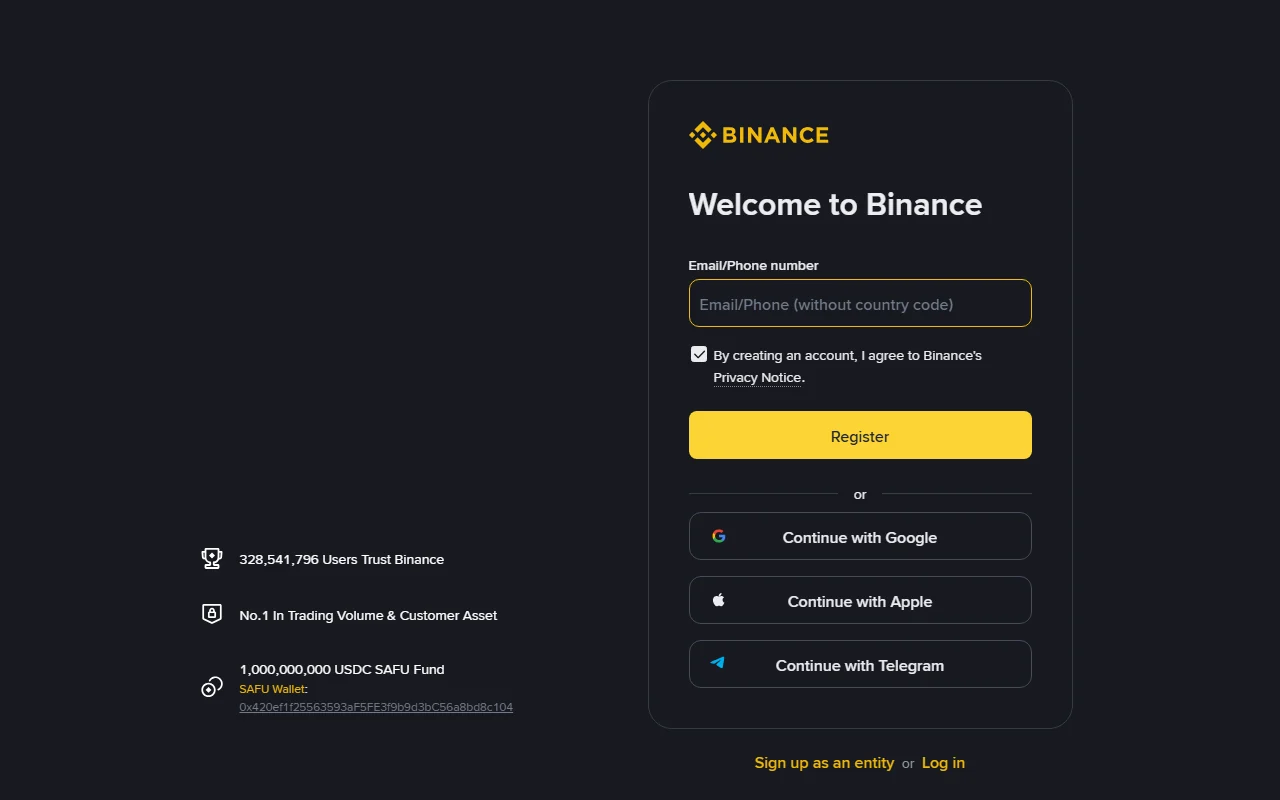
Binance အကောင့်အသစ်ဖွင့်မယ့်သူတွေအတွက် BN2886 ဖိတ်ကြားကုဒ်နဲ့ စာရင်းသွင်းတာကနေ အတည်ပြုကုဒ်ထည့်တာ၊ စကားဝှက်သတ်မှတ်တာ၊ အထောက်အထားတင်တာနဲ့ အကောင့်လုံခြုံရေးပြင်ဆင်တာအထိ လိုက်လုပ်နိုင်အောင် ဒီလမ်းညွှန်ကို အဆင့်လိုက် ပြထားပါတယ်။ အဆင့်တွေကို 2026-08-27 က စာရင်းသွင်းမျက်နှာပြင်နဲ့ တိုက်စစ်ထားပေမယ့် app ဗားရှင်း ဒါမှမဟုတ် ဒေသအလိုက် ခလုတ်အမည်တွေ အနည်းငယ် ကွာနိုင်ပါတယ်။
ကြော်ငြာဆိုင်ရာ ထုတ်ဖော်ပြောကြားချက် — ဒီဆောင်းပါးထဲမှာ မြှင့်တင်ရေးလင့်ခ် ပါဝင်ပါတယ်။ ခရစ်ပတိုအရောင်းအဝယ်မှာ ဆုံးရှုံးနိုင်ခြေရှိပြီး၊ ဒီအကြောင်းအရာဟာ ရင်းနှီးမြှုပ်နှံမှုအကြံပြုချက် မဟုတ်ပါဘူး။
BN2886 ဖိတ်ကြားကုဒ်နဲ့ ဘာအကျိုးခံစားခွင့် ရနိုင်သလဲ
ဖိတ်ကြားလင့်ခ် ဒါမှမဟုတ် BN2886 ကုဒ်နဲ့ အကောင့်ဖွင့်ရင် သတ်မှတ်ချက်နဲ့ကိုက်ညီတဲ့သူတွေအတွက် အရောင်းအဝယ်အခကြေးငွေကို အများဆုံး 20% အထိ လျှော့ခွင့် ရနိုင်ပါတယ်။ အမှန်တကယ်ရမယ့်နှုန်းနဲ့ သက်ဆိုင်တဲ့စည်းကမ်းချက်တွေကိုတော့ စာရင်းသွင်းချိန်မှာ မျက်နှာပြင်ပေါ် ပြသတဲ့အတိုင်းသာ အတည်ယူပါ။
BN2886 ဖြင့် Binance account ဖွင့်ပြီး fee discount ရယူရန်
ဖိတ်ကြားကုဒ်: BN2886
မစတင်မီ ပြင်ဆင်ထားရန်
- ရေရှည်သုံးနိုင်ပြီး ကိုယ်တိုင်ထိန်းချုပ်နိုင်တဲ့ အီးမေးလ် ဒါမှမဟုတ် ဖုန်းနံပါတ်
- တစ်ခုတည်းသီးသန့်စကားဝှက် ဖန်တီးဖို့ စကားဝှက်သိမ်းတဲ့ program
- အထောက်အထားစိစစ်မှုအတွက် ကိုယ်ပိုင်မှတ်ပုံတင်စာရွက်
- Passkey ဒါမှမဟုတ် အတည်ပြုကုဒ်ထုတ်တဲ့ app ဖွင့်ဖို့ ကိုယ်ပိုင်ဖုန်း
အကောင့်ရှိပြီးသားဆိုရင် အသစ်ထပ်မဖွင့်ပါနဲ့။ နေထိုင်ရာနိုင်ငံ၊ အသက်နဲ့ ကိုယ်ရေးအချက်အလက်တွေကို အမှန်အတိုင်းထည့်ပြီး၊ မရနိုင်တဲ့ဝန်ဆောင်မှုကို VPN ဒါမှမဟုတ် သူများရဲ့စာရွက်နဲ့ ကျော်ဖြတ်ဖို့ မကြိုးစားပါနဲ့။
အဆင့် ၁ — စာရင်းသွင်းမယ့်နည်းလမ်း ရွေးပါ
စာရင်းသွင်းမျက်နှာပြင်မှာ အများအားဖြင့် အောက်ပါနည်းလမ်းတွေကို တွေ့ရနိုင်ပါတယ်—
- အီးမေးလ်/ဖုန်းနံပါတ်
- Continue with Google
- Continue with Apple
- Continue with Telegram — စက် ဒါမှမဟုတ် ဒေသအလိုက် မပေါ်နိုင်ပါ
Google၊ Apple ဒါမှမဟုတ် Telegram နဲ့ စာရင်းသွင်းမယ်ဆိုရင် အဲဒီအကောင့်ရဲ့ စကားဝှက်၊ နှစ်ဆင့်အတည်ပြုမှုနဲ့ ပြန်လည်ရယူနည်းတွေကိုပါ လုံခြုံအောင် ထားပါ။ ပြန်လည်ရယူခွင့် မသေချာဘူးဆိုရင် ကိုယ်ပိုင်အီးမေးလ်/ဖုန်းနည်းလမ်းကို ရွေးပါ။
အဆင့် ၂ — အတည်ပြုကုဒ် ထည့်ပါ
အီးမေးလ်/ဖုန်းနည်းလမ်းမှာ ဂဏန်း ၆ လုံးပါတဲ့ အတည်ပြုကုဒ် ရောက်လာပါမယ်။ အဲဒီကုဒ်ကို ကိုယ်ဖွင့်ထားတဲ့ စာရင်းသွင်းမျက်နှာပြင်ထဲမှာသာ ထည့်ပြီး၊ အကူအညီဌာနဝန်ထမ်း၊ Telegram အက်ဒမင် ဒါမှမဟုတ် တခြားသူ ဘယ်သူ့ကိုမှ မပေးပါနဲ့။
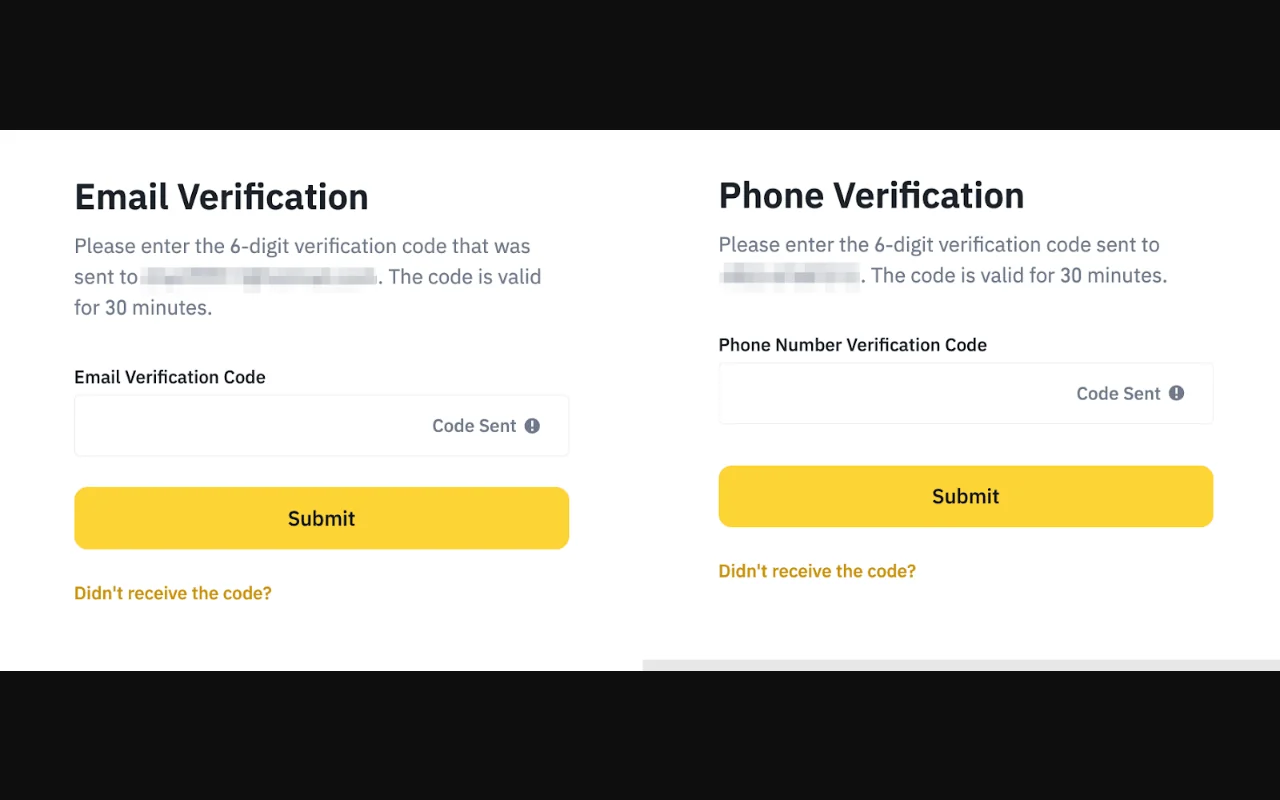
ကုဒ် မရောက်ဘူးဆိုရင်—
- အီးမေးလ်/ဖုန်းနံပါတ်ကို စာလုံးတစ်လုံးချင်း ပြန်စစ်ပါ။
- Spam ဒါမှမဟုတ် junk folder ကို စစ်ပါ။
- မျက်နှာပြင်ပေါ်က အချိန်ရေတွက်မှု ကုန်မှ ပြန်ပို့ခိုင်းပါ။
- မတောင်းထားဘဲ ရောက်လာတဲ့ကုဒ်ကို မထည့်၊ မမျှဝေဘဲ အီးမေးလ်လုံခြုံရေးကို စစ်ပါ။
အဆင့် ၃ — စကားဝှက် ဒါမှမဟုတ် ချိတ်ဆက်ထားတဲ့အကောင့်ကို ကာကွယ်ပါ
အီးမေးလ်/ဖုန်းနည်းလမ်းဆိုရင် မျက်နှာပြင်က အနည်းဆုံးလိုအပ်ချက်ကို လိုက်နာပြီး၊ စကားဝှက်သိမ်းတဲ့ program နဲ့ ပိုရှည်ပြီး မှန်းရခက်တဲ့ သီးသန့်စကားဝှက်တစ်ခု ဖန်တီးပါ။ အီးမေးလ်စကားဝှက်နဲ့ Binance စကားဝှက်ကို မတူအောင် ထားပါ။ အမည်၊ မွေးနေ့၊ ဖုန်းနံပါတ် ဒါမှမဟုတ် BN2886 ကို စကားဝှက်ထဲ မထည့်ပါနဲ့။
Google/Apple/Telegram နည်းလမ်းမှာတော့ Binance စကားဝှက်မျက်နှာပြင် မပေါ်နိုင်ပါဘူး။ အဲဒီအခါ ချိတ်ဆက်ထားတဲ့အကောင့်ရဲ့ စကားဝှက်၊ နှစ်ဆင့်အတည်ပြုမှုနဲ့ ပြန်လည်ရယူခွင့်ကို အရင်ကာကွယ်ပြီးမှ မျက်နှာပြင်ပေါ်က အဆင့်တွေကို ဆက်လုပ်ပါ။
အဆင့် ၄ — ဖိတ်ကြားကုဒ် ချိတ်မိမချိတ်မိ စစ်ပါ
အကောင့်ဖွင့်ပြီးကြောင်း စာတန်းပေါ်လာပြီးနောက် ဖိတ်ကြားကုဒ်အဆင့်မှာ BN2886 ကို အလိုအလျောက်ဖြည့်ထားတာ တွေ့နိုင်ပါတယ်။ ကုဒ်ဘေးမှာ Linked ဒါမှမဟုတ် ချိတ်ဆက်ပြီးကြောင်း ပြတဲ့အခြေအနေကို စစ်ပါ။
- အတည်မပြုခင်
BN2886မှန်မမှန် စစ်ပါ။ - မမှန်ကြောင်းပြရင် အဲဒီအဆင့်မှာ ရပ်ပြီး ကုဒ်ကို ပြန်စစ်ပါ။
- တစ်ခါချိတ်ပြီးသွားတဲ့ကုဒ်ကို နောက်မှ ပြန်ပြောင်းလို့မရတဲ့အတွက် မကျော်ခင် စစ်ပါ။
- အခကြေးငွေလျှော့ခွင့်နဲ့ သက်ဆိုင်တဲ့စည်းကမ်းချက်ကို မျက်နှာပြင်ပေါ်က လက်ရှိအချက်အလက်အတိုင်း ယူပါ။
အဆင့် ၅ — နေထိုင်ရာနဲ့ အထောက်အထားကို အမှန်အတိုင်း ဖြည့်ပါ
စာရင်းသွင်းခြင်းနဲ့ အထောက်အထားစိစစ်ခြင်းက သီးခြားအဆင့်နှစ်ခု ဖြစ်ပါတယ်။ မှတ်ပုံတင်စာရွက်နဲ့ ကိုက်ညီတဲ့ နေထိုင်ရာ၊ အမည်နဲ့ မွေးသက္ကရာဇ်ကိုသာ ထည့်ပါ။ အထောက်အထားစိစစ်မှု ပြီးသွားတိုင်း ဝန်ဆောင်မှုအားလုံး သုံးခွင့်ရတယ်လို့ မဆိုလိုတဲ့အတွက်၊ အကောင့်ထဲမှာ ပြသတဲ့ ခွင့်ပြုချက်ကို သီးခြားစစ်ပါ။
အထောက်အထားတင်ရာမှာ အကူအညီလိုရင် Binance KYC နှင့် 2FA အဆင့်များ ကို ဆက်ဖတ်နိုင်ပါတယ်။
အဆင့် ၆ — ငွေမသွင်းမီ လုံခြုံရေးကို ဖွင့်ပါ
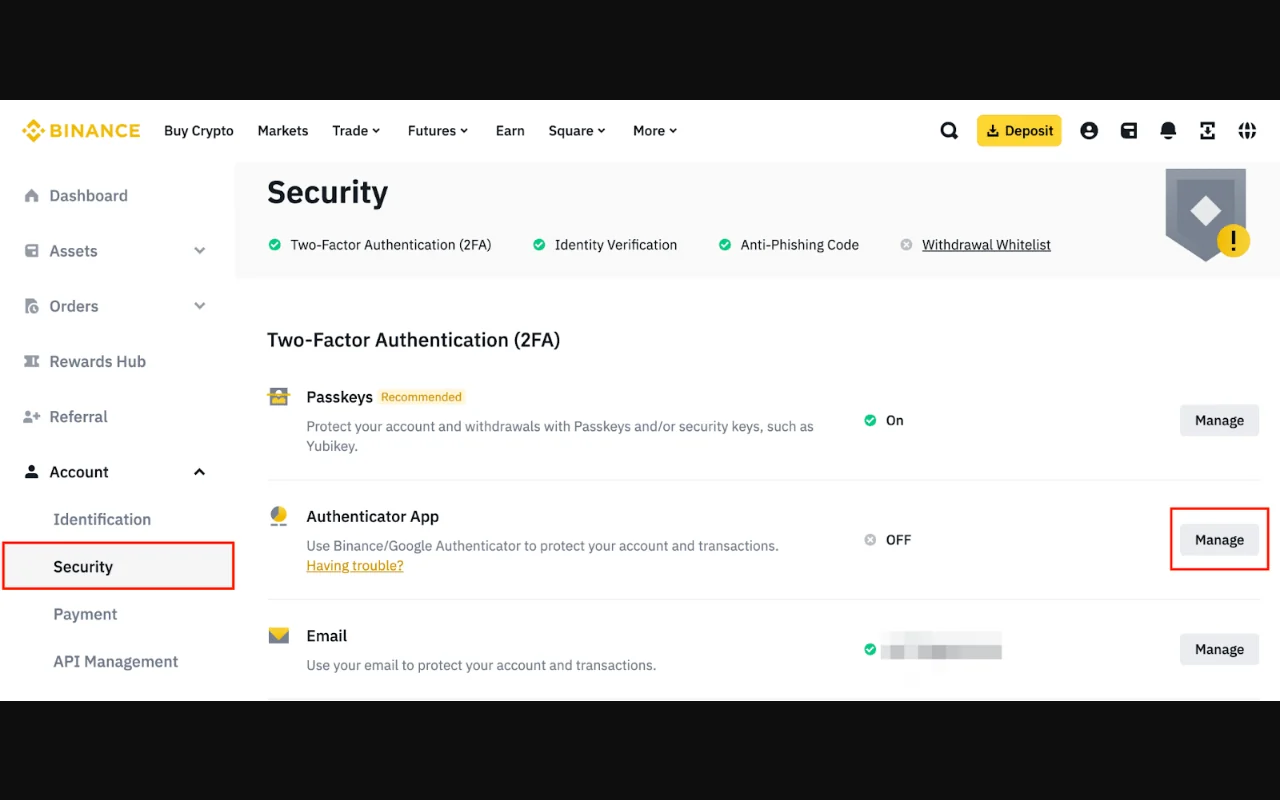
အကောင့်ထဲဝင်ပြီးနောက် Account Security ထဲသွားပြီး—
- Passkey ဒါမှမဟုတ် အတည်ပြုကုဒ်ထုတ်တဲ့ app ကို ဖွင့်ပါ။
- ပြန်လည်ရယူရေးကုဒ်နဲ့ အရံကုဒ်တွေကို စကားဝှက်သိမ်းတဲ့ program ဒါမှမဟုတ် အင်တာနက်နဲ့မချိတ်တဲ့ လုံခြုံတဲ့နေရာမှာ သိမ်းပါ။
- Anti-Phishing Code ကို ဖွင့်ပါ။
- စက်နဲ့ အကောင့်လှုပ်ရှားမှုထဲမှာ မသိတဲ့ဝင်ရောက်မှု ရှိမရှိ စစ်ပါ။
- ကိုယ့်အီးမေးလ်အကောင့်ကိုပါ သီးသန့်စကားဝှက်နဲ့ နှစ်ဆင့်အတည်ပြုမှုနဲ့ ကာကွယ်ပါ။
- ပုံမှန်သုံးတဲ့ ငွေထုတ်လိပ်စာတွေရှိရင် လိပ်စာကြိုတင်မှတ်ထားတဲ့ စနစ်ကို စစ်ဆေးနိုင်ပါတယ်။
ဖုန်း၊ passkey ဒါမှမဟုတ် အတည်ပြုကုဒ်ထုတ်တဲ့ app ပျောက်သွားရင် အီးမေးလ်ကို အရင်ကာကွယ်ပြီး စကားဝှက်ပြောင်းပါ။ အကောင့်ထဲ ဝင်နိုင်သေးရင် မသိတဲ့စက်နဲ့ ဝင်ရောက်မှုတွေကို ဖယ်ပြီး Support Center ကနေ ပြန်လည်ရယူပါ။ အတည်ပြုကုဒ်၊ စကားဝှက်၊ အတည်ပြုကုဒ်ထုတ်တဲ့ app ရဲ့ကုဒ်၊ ပြန်လည်ရယူရေးကုဒ် ဒါမှမဟုတ် seed phrase ကို ဘယ်သူ့ကိုမှ မပေးပါနဲ့။
စာရင်းသွင်းမှု ပြီးပြီလား ဆိုတာ ပြန်စစ်ရန်
- ကိုယ်ပိုင်အီးမေးလ်/ဖုန်း ဒါမှမဟုတ် ချိတ်ဆက်ထားတဲ့အကောင့်ကို သုံးထားပြီ
- အတည်ပြုကုဒ်ကို စာရင်းသွင်းမျက်နှာပြင်ထဲမှာသာ ထည့်ထားပြီ
- သီးသန့်စကားဝှက် ဒါမှမဟုတ် ချိတ်ဆက်အကောင့်လုံခြုံရေး ပြီးပြီ
-
BN2886နဲ့ Linked အခြေအနေကို စစ်ထားပြီ - အခကြေးငွေလျှော့ခွင့်နဲ့ လက်ရှိစည်းကမ်းချက်ကို မျက်နှာပြင်ပေါ်မှာ စစ်ထားပြီ
- နေထိုင်ရာနဲ့ အထောက်အထားအချက်အလက် မှန်ကန်ပြီ
- Passkey/အတည်ပြုကုဒ် app နဲ့ ပြန်လည်ရယူနည်း ပြီးပြီ
- ငွေမသွင်းမီ အကောင့်လှုပ်ရှားမှုကို စစ်ထားပြီ
ဆက်လက်သုံးချင်တဲ့ ဝန်ဆောင်မှုတစ်ခုရှိရင် Myanmar မှာ product သုံးလို့ရမရ စစ်နည်း ကို အရင်ဖတ်ပါ။ အကောင့်ဖွင့်လိုက်တိုင်း အရောင်းအဝယ်လုပ်ရမယ်လို့ မဆိုလိုပါဘူး။ အကျိုးခံစားခွင့်နဲ့ ဆုံးရှုံးနိုင်ခြေကို နားလည်ပြီးမှ ငွေသွင်းဖို့ ဒါမှမဟုတ် အော်ဒါတင်ဖို့ စဉ်းစားပါ။