
Binance Stocks နှင့် bStocks
Myanmar မှာ Binance Stocks နဲ့ ETF သုံးလို့ရမရ စစ်နည်း (2026)
မြန်မာအကောင့်တစ်ခုမှာ Binance Stocks၊ ETF နဲ့ ဝယ်ချင်တဲ့ ticker ကို လက်ရှိသုံးလို့ရမရဆိုတာ တရားဝင် menu၊ အထောက်အထားစိစစ်မှု၊ Preview ခွင့်ပြုချက်နဲ့ နိုင်ငံအလိုက်ကန့်သတ်ချက် သက်သေတွေနဲ့ စစ်နည်း။
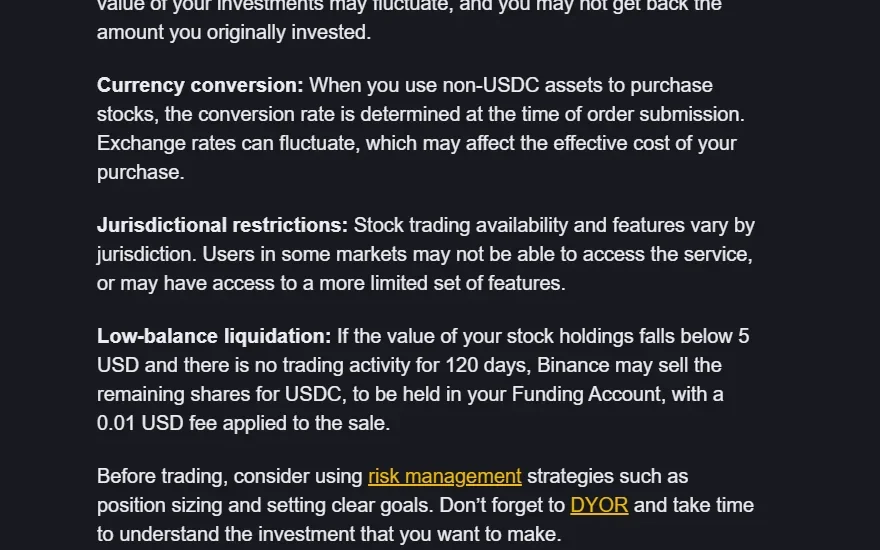
မြန်မာနိုင်ငံမှာ Binance Stocks နဲ့ ETF သုံးလို့ရမရဆိုတာ အကောင့်ဖွင့်လို့ရတယ်ဆိုတဲ့အချက်တစ်ခုတည်းနဲ့ မဆုံးဖြတ်နိုင်ပါဘူး။ Spot crypto၊ Futures၊ Binance Stocks၊ ETF share နဲ့ bStocks တို့ရဲ့ အရည်အချင်းသတ်မှတ်ချက်က တစ်ခုနဲ့တစ်ခု မတူပါဘူး။ ပစ္စည်းတစ်ခုချင်းစီအလိုက် တာဝန်ယူတဲ့ကုမ္ပဏီ၊ လိုအပ်တဲ့အထောက်အထားစိစစ်မှုအဆင့်၊ နေထိုင်ရာနိုင်ငံနဲ့ ဒေသဆိုင်ရာကန့်သတ်ချက်တွေ ကွာနိုင်ပါတယ်။ အလုံခြုံဆုံးနည်းလမ်းကတော့ တရားဝင်အကောင့်မျက်နှာပြင်နဲ့ လက်ရှိထုတ်ကုန်စည်းကမ်းချက်တွေက ပြသတဲ့အတိုင်းသာ လိုက်နာဖို့ပါပဲ။
2026 ခုနှစ်အတွက် အဖြေ — အားလုံးအတွက်တူညီတဲ့ "ရ/မရ" မရှိပါ
2026-08-27 မှာ ပြန်စစ်ထားတဲ့ Binance Stocks တရားဝင်လမ်းညွှန် မှာ ဒီဝန်ဆောင်မှုကို အရည်အချင်းပြည့်မီသူများ အတွက်လို့ ဖော်ပြထားပြီး၊ ရရှိနိုင်မှုနဲ့ လုပ်ဆောင်ချက်တွေဟာ နိုင်ငံအလိုက် ကွာခြားကြောင်း ပြောထားပါတယ်။ ဒါပေမယ့် အဲဒီအများပြည်သူဖတ်နိုင်တဲ့စာမျက်နှာမှာ မြန်မာအကောင့်အားလုံးအတွက် "ရတယ်/မရဘူး" ဆိုတဲ့ နိုင်ငံအလိုက်အဖြေကို မပေးထားပါဘူး။
ဒါကြောင့် လက်ရှိအဖြေကို တိတိကျကျပြောရရင်— မြန်မာနိုင်ငံသားတိုင်း သုံးလို့ရတယ်လို့လည်း မပြောနိုင်၊ မြန်မာနိုင်ငံသားတိုင်း မရဘူးလို့လည်း အများပြည်သူလမ်းညွှန်တစ်ခုတည်းနဲ့ မပြောနိုင်ပါဘူး။ မိမိရဲ့ အမှန်တကယ်နေထိုင်ရာနဲ့ အထောက်အထားစိစစ်မှုအောက်က အကောင့်မှာ Stocks menu၊ ဝယ်ချင်တဲ့ ticker နဲ့ Preview/Confirm အဆင့်က ခွင့်ပြုချက် သုံးခုလုံး အောင်မြင်မှသာ အဲဒီအကောင့်နဲ့ အဲဒီပစ္စည်းကို လက်ရှိအချိန်မှာ သုံးလို့ရတယ်လို့ သတ်မှတ်ပါ။
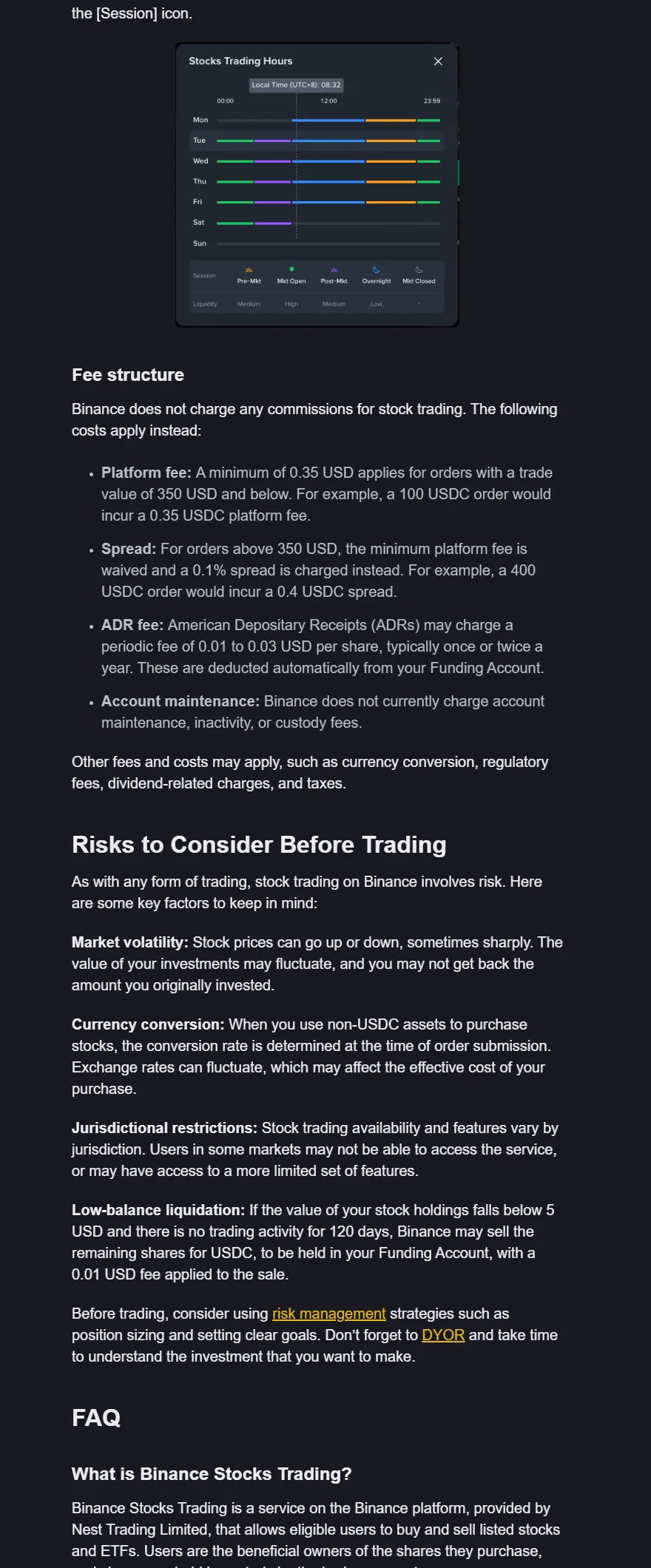
Binance Academy တရားဝင် Stocks guide ၏ real webpage screenshot; "Jurisdictional restrictions" အပိုဒ်က market အချို့တွင် service မရနိုင် သို့မဟုတ် feature ကန့်သတ်နိုင်ကြောင်းဖော်ပြသည်။ Screenshot: 2026-08-27. Official source
"Binance သုံးလို့ရတယ်" ဆိုတာ ဘာကိုဆိုလိုသလဲ
သုံးလို့ရမရဆိုတာကို အနည်းဆုံး လေးအလွှာ ခွဲကြည့်ရပါတယ်။
| အလွှာ | မေးရမည့်မေးခွန်း | ရတယ်ဆိုလည်း ဘာမအာမခံသလဲ |
|---|---|---|
| အကောင့် | စာရင်းသွင်း၊ ဝင်၊ အထောက်အထားတင်လို့ရသလား | ပစ္စည်းအားလုံး ရမည်မဟုတ် |
| ပစ္စည်းအမျိုးအစား | Stocks၊ bStocks သို့မဟုတ် Futures menu ရှိသလား | ticker အားလုံး ရမည်မဟုတ် |
| ticker | လိုချင်တဲ့ စတော့/ETF/contract ပေါ်သလား | အော်ဒါလက်ခံမည်ဟု မဆိုနိုင်သေး |
| အရောင်းအဝယ် | Preview/အတည်ပြုအဆင့်အထိ သွားလို့ရသလား | နောင်အခါ ဆက်ရမည်ဟု မအာမခံ |
ဖိတ်ကြားလင့်ခ်နဲ့ စာရင်းသွင်းလို့ရတာ၊ အထောက်အထားစိစစ်မှု အောင်တာ ဒါမှမဟုတ် menu မြင်ရတာ တစ်ခုခုကိုပဲကြည့်ပြီး "မြန်မာမှာ ဒီပစ္စည်းအပြည့်အဝ သုံးလို့ရပြီ" လို့ မပြောသင့်ပါဘူး။
၁။ တရားဝင်ဝဘ်ဆိုက်/app ဟုတ်မဟုတ် အရင်စစ်ပါ
ဘရောက်ဇာလိပ်စာကို ကိုယ်တိုင်ကြည့်ပြီး Binance ရဲ့ တရားဝင်လိပ်စာ ဟုတ်မဟုတ် အတည်ပြုပါ။ ရှာဖွေမှုကြော်ငြာ၊ Telegram bot၊ လူမှုကွန်ရက်စာတိုထဲက လင့်ခ် ဒါမှမဟုတ် စာနဲ့ပို့လိုက်တဲ့ APK ဖိုင်တွေကို မသုံးပါနဲ့။ App store မှာ ထုတ်ဝေသူအမည်နဲ့ ဝဘ်ဆိုက်လိပ်စာ စာလုံးပေါင်းကို စစ်ပါ။
တရားဝင်စာမျက်နှာဖြစ်ရင်တောင် ဘရောက်ဇာ extension အတု ဒါမှမဟုတ် ဗိုင်းရပ်စ်ကြောင့် လမ်းလွဲသွားနိုင်ပါတယ်။ ဒါကြောင့် bookmark ကနေဝင်ပါ၊ စက်ကို အသစ်ပြင်ဆင်ထားပါ၊ စကားဝှက်သိမ်းတဲ့ program ရဲ့ လိပ်စာတိုက်စစ်တဲ့စနစ်ကိုလည်း သုံးပါ။
၂။ နေထိုင်ရာနဲ့ ကိုယ်ရေးအချက်အလက်ကို မှန်မှန်ကန်ကန် ဖြည့်ပါ
နိုင်ငံ ဒါမှမဟုတ် ဒေသရွေးတဲ့နေရာမှာ မိမိအမှန်တကယ်နေထိုင်ရာနဲ့ ကိုယ်ပိုင်အထောက်အထားစာရွက်ကိုသာ သုံးပါ။ ပစ္စည်းတစ်ခုရဖို့အတွက် VPN၊ တခြားနိုင်ငံလိပ်စာ၊ သူများအထောက်အထား ဒါမှမဟုတ် အတုလုပ်ထားတဲ့စာရွက်တွေ သုံးမိရင် စည်းကမ်းချိုးဖောက်မှု၊ အကောင့်ကန့်သတ်ခံရမှုနဲ့ ငွေထုတ်မရတော့တဲ့အခြေအနေ ဖြစ်စေနိုင်ပါတယ်။ ဒီဝဘ်ဆိုက်က အဲဒီနည်းလမ်းတွေကို လုံးဝမညွှန်ကြားပါဘူး။
ခရီးသွားနေတာ၊ နိုင်ငံသားဖြစ်မှုနဲ့ နေထိုင်ရာ မတူတာ ဒါမှမဟုတ် စာရွက်ထုတ်ပေးတဲ့နိုင်ငံ မတူတာမျိုး ရှိရင် ကိုယ့်ဘာသာမမှန်းဘဲ တရားဝင်အကူအညီဌာန ဒါမှမဟုတ် စည်းကမ်းချက်တွေထဲက လိုအပ်ချက်ကို မေးပါ။
၃။ အထောက်အထားစိစစ်မှုနဲ့ ပစ္စည်းသင့်တော်မှုကို ခွဲထားပါ
အထောက်အထားစိစစ်မှု ပြီးသွားပေမယ့် ပစ္စည်းအားလုံးကို သုံးခွင့်ရမှာ မဟုတ်ပါဘူး။ မေးခွန်းလွှာ ထပ်ဖြေခိုင်းတာ၊ ငွေရင်းမြစ်နဲ့ ဓနအရင်းအမြစ်အချက်အလက် တောင်းတာ၊ အန္တရာယ်သိရှိကြောင်း အသိအမှတ်ပြုခိုင်းတာ ဒါမှမဟုတ် သင့်တော်မှုစစ်ဆေးမှု လိုနိုင်ပါတယ်။ အဲဒီလိုတောင်းလာရင် အမှန်အတိုင်းဖြည့်ပြီး၊ မရှင်းလင်းတာရှိရင် တရားဝင်အကူအညီဌာနကို မေးပါ။
အန္တရာယ်ဆိုင်ရာမေးခွန်းလွှာကို အဖြေရှာပြီး မှန်းဆမဖြေပါနဲ့။ မသိတဲ့မေးခွန်းရှိရင် အဲဒီပစ္စည်းဘယ်လိုအလုပ်လုပ်လဲဆိုတာ အရင်လေ့လာပါ။ သင့်တော်မှုစစ်ဆေးမှုကို ကျော်ဖြတ်လိုက်လို့ အဲဒီပစ္စည်းက ကိုယ်နဲ့သင့်တော်တယ်လို့ အာမခံချက် မရပါဘူး။
၄။ ပစ္စည်းအမျိုးအစားတစ်ခုချင်းစီကို သီးခြားစစ်ပါ
- Binance Stocks — Trade menu ထဲမှာ Stocks ပေါ်မပေါ်၊ ဘယ်ကုမ္ပဏီအောက်မှာလဲနဲ့ လက်ရှိစည်းကမ်းချက်တွေကို စစ်ပါ။
- ETF share — Stocks ဝန်ဆောင်မှုထဲက စာရင်းဝင် ETF share လား၊ Futures ထဲက ETF နဲ့ချိတ်ထားတဲ့ perpetual လား ခွဲပါ။
- bStocks — token အဖြစ်ထုတ်ထားတဲ့ငွေချေးသက်သေခံလက်မှတ်တွေအတွက် အရည်အချင်း၊ ခွင့်ပြုထားတဲ့နိုင်ငံစာရင်းနဲ့ လက်ရှိအကြောင်းကြားစာတွေကို ဖတ်ပါ။
- Futures/TradFi Perps — Futures ဖွင့်ထားမှု၊ အန္တရာယ်အသိအမှတ်ပြုမှု၊ leverage ကန့်သတ်ချက်နဲ့ ticker ရရှိနိုင်မှုကို စစ်ပါ။
Binance Stocks လမ်းညွှန် နဲ့ bStocks လမ်းညွှန် နှစ်ခုစလုံးမှာ အရည်အချင်းပြည့်မီသူများသာ ဆိုတာနဲ့ နိုင်ငံအလိုက်ကန့်သတ်ချက်ရှိကြောင်း ဖော်ပြထားပါတယ်။ ပစ္စည်းစာမျက်နှာ မပေါ်တာကို စက်ပိုင်းဆိုင်ရာအမှားလို့ အမြဲမယူဆပါနဲ့။
၅။ ticker တစ်ခုချင်းစီအလိုက် ရမရကို စစ်ပါ
Menu ရှိနေပေမယ့် ticker တစ်ခုချင်းစီရဲ့ ရရှိနိုင်မှုက မတူနိုင်ပါဘူး။ ရှာဖွေမှုရလဒ်မှာ ပေါ်ရုံနဲ့ ဝယ်လို့ရောင်းလို့ ရမယ်လို့ မဆိုနိုင်ပါ။
- ကုမ္ပဏီ ဒါမှမဟုတ် ရန်ပုံငွေအမည်အပြည့်အစုံနဲ့ ticker ကို တိုက်စစ်ပါ။
- စတော့လား၊ ETF လား၊ bStock လား၊ perpetual လား ဆိုတဲ့ အမှတ်အသားကို ဖတ်ပါ။
- အရောင်းအဝယ်ချိန်အခြေအနေ၊ အော်ဒါအမျိုးအစားနဲ့ အနည်းဆုံးပမာဏကို စစ်ပါ။
- Preview ထဲက ကန့်သတ်ချက် ဒါမှမဟုတ် အရည်အချင်းဆိုင်ရာစာတန်းကို ဖတ်ပါ။
- အတည်မပြုခင် အခကြေးငွေ၊ ငွေရှင်းလင်းပုံနဲ့ တာဝန်ယူတဲ့ကုမ္ပဏီကို အရင်စစ်ပါ။
ရနိုင်တဲ့ပစ္စည်းအရေအတွက်ကို သူများအကောင့် screenshot ကနေ မတွက်ပါနဲ့။ အကောင့်တည်ထောင်ထားတဲ့ကုမ္ပဏီ၊ နေထိုင်ရာနဲ့ ဝန်ဆောင်မှုဖြန့်ချိတဲ့အဆင့်အလိုက် စာရင်းက ကွာနိုင်ပါတယ်။
ပေါ်လာတဲ့စာတန်းအမျိုးအစားကို ဘယ်လိုခွဲမလဲ
| စာတန်းအမျိုးအစား | ဖြစ်နိုင်သည့်အဓိပ္ပာယ် | လုပ်သင့်တာ |
|---|---|---|
| Verification required | အထောက်အထားစိစစ်မှု မပြီးသေး | တရားဝင်စိစစ်မှုအဆင့်ကို လိုက်ပါ |
| Product unavailable | ဒေသ သို့မဟုတ် အကောင့်ဆိုင်ရာ ကန့်သတ်ချက် ဖြစ်နိုင် | စည်းကမ်းချက်နှင့် အကူအညီဌာနကို စစ်ပါ |
| Symbol unavailable | အဲဒီပစ္စည်းအတွက်သီးသန့် ကန့်သတ်ချက် သို့မဟုတ် စာရင်းမှထုတ်ခြင်း | ကြေညာချက်/contract စာမျက်နှာကို စစ်ပါ |
| Risk questionnaire required | အန္တရာယ်သိရှိကြောင်း အသိအမှတ်ပြုရန်လို | အလုပ်လုပ်ပုံကို လေ့လာပြီး အမှန်အတိုင်းဖြေပါ |
| Account restricted/review | စည်းကမ်းလိုက်နာမှု သို့မဟုတ် လုံခြုံရေးစစ်ဆေးမှု ဖြစ်နိုင် | မှတ်တမ်းနံပါတ်ဖြင့် တရားဝင်အကူအညီဌာနကို ဆက်သွယ်ပါ |
| Maintenance/system error | ယာယီ စနစ်ပိုင်းပြဿနာ ဖြစ်နိုင် | အခြေအနေ/ကြေညာချက်ကို စစ်ပြီး မကြာခဏ ထပ်မတင်ပါနှင့် |
စာတန်းကို screenshot ရိုက်မယ်ဆိုရင် အမည်၊ အကောင့်နံပါတ်၊ အီးမေးလ်၊ လက်ကျန်ငွေ၊ QR code၊ လုံခြုံရေးကုဒ်နဲ့ အတွင်းပိုင်းလိပ်စာတွေကို ဖုံးထားပါ။ Screenshot အဟောင်းကို ခွင့်ပြုချက်သက်သေအဖြစ် မယူပါနဲ့။
စည်းကမ်းချက်နဲ့ ကြေညာချက်ရက်စွဲကို ကြည့်ပါ
မူဝါဒတွေ ပြောင်းနိုင်တဲ့အတွက် ဘလော့အဟောင်း၊ screenshot အဟောင်း ဒါမှမဟုတ် သူငယ်ချင်းအကောင့်ကို အားမကိုးပါနဲ့။ လက်ရှိ အသုံးပြုမှုစည်းကမ်းချက်၊ အန္တရာယ်သတိပေးချက်၊ ပစ္စည်းအလိုက်အကြောင်းကြားစာနဲ့ contract အသေးစိတ်ကို ဖတ်ပါ။
မှတ်စုထဲမှာ အောက်ပါအချက်တွေကို မှတ်ထားပါ—
- စာမျက်နှာခေါင်းစဉ်နဲ့ လိပ်စာ
- နောက်ဆုံးပြင်ဆင်/ထုတ်ဝေသည့်ရက်စွဲ
- အကောင့်ကုမ္ပဏီနဲ့ ဒေသဆိုင်ရာအခြေအနေ
- ပစ္စည်းအမျိုးအစားနဲ့ ticker
- စစ်ခဲ့သည့်နေ့နဲ့ အချိန်ဇုန်
ဘာသာပြန်နဲ့ မူရင်းစာသား ကွာနေရင် တရားဝင်မူရင်းဗားရှင်းကို စစ်ပါ။
ပလက်ဖောင်းမှာရတာနဲ့ ဒေသဆိုင်ရာတရားဝင်မှု မတူပါဘူး
ပလက်ဖောင်းက လုပ်ဆောင်ချက်တစ်ခုကို ပြထားတာဟာ ဒေသဆိုင်ရာဥပဒေ၊ အခွန်ကိုင်တွယ်ပုံ ဒါမှမဟုတ် ရင်းနှီးမြှုပ်နှံသူအကာအကွယ်ကို အတည်ပြုပေးတာ မဟုတ်ပါဘူး။ ခရစ်ပတို၊ ငွေချေးသက်သေခံလက်မှတ်နဲ့ နယ်စပ်ဖြတ်ကျော်ငွေပေးချေမှုဆိုင်ရာ စည်းမျဉ်းတွေ ပြောင်းနိုင်ပြီး၊ လူတစ်ဦးချင်းအခြေအနေအလိုက် သက်ရောက်မှု ကွာနိုင်ပါတယ်။
ဒီဆောင်းပါးက မြန်မာနိုင်ငံအတွက် တိကျတဲ့ဥပဒေဆိုင်ရာအကြံပြုချက် မပေးပါဘူး။ ကိုယ်ပိုင်နေထိုင်ရာ၊ နိုင်ငံသားဖြစ်မှု၊ အခွန်အခြေအနေ ဒါမှမဟုတ် စီးပွားရေးအသုံးပြုမှုအတွက်ဆိုရင် ကျွမ်းကျင်တဲ့ ဒေသခံဥပဒေ/အခွန်ပညာရှင်ကို မေးဖို့ လိုနိုင်ပါတယ်။ "App မှာ ခလုတ်ရှိတယ်" ဆိုတာကို ဥပဒေအရခွင့်ပြုချက်အဖြစ် မယူပါနဲ့။
အထောက်အထား ဘာကြောင့် ထပ်တောင်းနိုင်သလဲ
စာရွက်သက်တမ်းကုန်တာ၊ ကိုယ်ရေးအချက်အလက်ပြောင်းတာ၊ ပုံမှန်မဟုတ်တဲ့ဝင်ရောက်မှု ဒါမှမဟုတ် ငွေလွှဲမှု၊ စည်းမျဉ်းအသစ်ထွက်တာ ဒါမှမဟုတ် အချိန်အခါအလိုက်ပြန်စစ်တာတွေကြောင့် အထောက်အထား ထပ်တောင်းနိုင်ပါတယ်။ တစ်ကြိမ်စိစစ်ပြီးရင် အမြဲတမ်းပြီးသွားပြီလို့ မယူဆပါနဲ့။
- စာရွက်သက်တမ်း ကုန်မကုန် စစ်ပါ။
- အမည်/နေထိုင်ရာ ပြောင်းရင် တရားဝင်လုပ်ငန်းစဉ်ကို သုံးပါ။
- ငွေရင်းမြစ်တောင်းလာရင် အတုလုပ်ထားတဲ့စာရွက် မတင်ပါနဲ့။
- သတ်မှတ်ရက်နဲ့ ငွေထုတ်/အရောင်းအဝယ်အပေါ် သက်ရောက်မှုကို ဖတ်ပါ။
- အကူအညီတောင်းခံမှုကို တရားဝင်မှတ်တမ်းနံပါတ်နဲ့ မှတ်ထားပါ။
ခွင့်ပြုချက်မရရင် ဘာလုပ်မလဲ
- စာတန်းအပြည့်အစုံကို ဖတ်ပြီး ကိုယ်ရေးအချက်အလက်ဖုံးထားတဲ့ မှတ်တမ်းယူပါ။
- တရားဝင်အခြေအနေ/ကြေညာချက်မှာ ပြုပြင်ထိန်းသိမ်းမှု ရှိမရှိ စစ်ပါ။
- အထောက်အထား၊ နေထိုင်ရာနဲ့ စာရွက်အချက်အလက် မှားမမှား စစ်ပါ။
- ပစ္စည်းဆိုင်ရာစည်းကမ်းချက်နဲ့ ticker အလိုက်အကြောင်းကြားစာကို ဖတ်ပါ။
- တရားဝင်အကူအညီဌာနကို မှတ်တမ်းနံပါတ်နဲ့ မေးပါ။
- VPN၊ သူများအထောက်အထား ဒါမှမဟုတ် တရားမဝင် APK နဲ့ ကျော်ဖြတ်ဖို့ မကြိုးစားပါနဲ့။
- စည်းမျဉ်းနဲ့အညီရှိတဲ့ အခြားရွေးချယ်စရာ လိုအပ်ရင် ဒေသခံပညာရှင်နဲ့ တိုင်ပင်ပါ။
အကူအညီဌာနကို စကားဝှက်၊ အတည်ပြုကုဒ်၊ အီးမေးလ်ကုဒ်၊ seed phrase ဒါမှမဟုတ် private key ကို ဘယ်တော့မှ မပေးပါနဲ့။ "ခွင့်ပြုချက်ဖွင့်ပေးမယ်" ဆိုပြီး ငွေတောင်းတဲ့သူကို မယုံပါနဲ့။
ဖိတ်ကြားလင့်ခ်နဲ့ ခွင့်ပြုချက်ကို မရောပါနဲ့
ဖိတ်ကြားလင့်ခ်နဲ့ အကောင့်ဖွင့်တာက ပစ္စည်းသုံးခွင့်ကို လုံးဝမပြောင်းလဲပါဘူး။ ဖိတ်ကြားကုဒ်ဟာ စာရင်းသွင်းမှုကို ဘယ်သူ့ကနေလာလဲ မှတ်တမ်းတင်ဖို့ ဒါမှမဟုတ် အရည်အချင်းပြည့်ရင် အခကြေးငွေအကျိုးခံစားခွင့်ရဖို့သာ ဖြစ်ပြီး၊ ကန့်သတ်ထားတဲ့ပစ္စည်းကို ဖွင့်ပေးတဲ့ကုဒ် မဟုတ်ပါဘူး။ ဆုကြေး၊ အခကြေးငွေပြန်အမ်းမှု ဒါမှမဟုတ် တောင်းဆိုမှုတစ်ခုကို တရားဝင်စာရင်းသွင်းမှု/အခကြေးငွေမျက်နှာပြင်မှာ မတွေ့ရင် မယုံပါနဲ့။
စာရင်းသွင်းလင့်ခ် အောင်မြင်တာနဲ့ Stocks/bStocks/Futures သုံးခွင့်ရတာကြားမှာ ဥပဒေအရဖြစ်စေ နည်းပညာအရဖြစ်စေ ဆက်စပ်မှု မရှိနိုင်ပါဘူး။
သုံးလမတိုင်မီ ပြန်စစ်ရမည့် checklist
- တရားဝင်ဝဘ်ဆိုက်/app ကနေ ဝင်ထားသလား။
- နေထိုင်ရာနဲ့ အထောက်အထားအချက်အလက် အမှန်ဖြစ်သလား။
- ပစ္စည်း menu နဲ့ ticker နှစ်ခုလုံး ရသလား။
- ပစ္စည်းအမှတ်အသားနဲ့ ပိုင်ဆိုင်မှုပုံစံကို မှန်ကန်စွာ ခွဲထားသလား။
- လက်ရှိစည်းကမ်းချက်/ကြေညာချက်ရက်စွဲကို စစ်ပြီးသလား။
- အော်ဒါ Preview မှာ ကန့်သတ်ချက်၊ အခကြေးငွေနဲ့ ငွေရှင်းလင်းပုံကို ဖတ်ပြီးသလား။
- ဒေသဆိုင်ရာဥပဒေ/အခွန်နဲ့ပတ်သက်ပြီး မသေချာတာ ရှိသလား။
- ဖိတ်ကြားကုဒ်အကျိုးခံစားခွင့်ကို ပစ္စည်းသုံးခွင့်နဲ့ မရောထားဘူးလား။
- အကောင့်ကန့်သတ်ခံရရင် ဘယ်လိုထွက်မလဲဆိုတဲ့ အစီအစဉ် ရှိသလား။
အကောင်းဆုံးစည်းမျဉ်းက ရိုးရှင်းပါတယ်— မိမိအကောင့်၊ မိမိအထောက်အထား၊ မိမိနေထိုင်ရာနဲ့ မိမိလိုချင်တဲ့ ticker အတွက် တရားဝင်မျက်နှာပြင်က ခွင့်ပြုသလောက်သာ သုံးပါ။ ဒီနေ့ရနေတာကို နောင်အခါအာမခံချက်အဖြစ် မယူပါနဲ့။
တရားဝင်သက်သေကို မှတ်တမ်းတင်ရန်
အကောင့်ကို စစ်ဆေးတဲ့နေ့မှာ အောက်ပါသက်သေတွေကို ကိုယ်ရေးအချက်အလက်ဖုံးပြီး သိမ်းထားပါ— Stocks menu၊ ဝယ်ချင်တဲ့ ticker နဲ့ ပစ္စည်းအမှတ်အသား၊ ခွင့်ပြုချက်စာတန်း၊ Preview စာမျက်နှာက တာဝန်ယူကုမ္ပဏီ/အခကြေးငွေ/ငွေရှင်းလင်းပုံနဲ့ လက်ရှိစည်းကမ်းချက်လိပ်စာ။ အများပြည်သူဆောင်းပါး ဒါမှမဟုတ် သူငယ်ချင်း screenshot ကို မိမိအကောင့်ရဲ့ ခွင့်ပြုချက်သက်သေအဖြစ် မယူပါနဲ့။
တရားဝင်အရင်းအမြစ်များ—